Grafana Alerting
概述
参考:
Alert rules(警报规则) # 确定是否触发警报的规则。e.g. 评估规则的周期(i.e. 多久检查一次告警是否应该触发)、etc.
Notification policies(通知策略) # 确定警报如何路由到联络点。e.g. 根据什么条件分组、发送前等待多久、相同警报重新发送的时间间隔、etc.
Contack points(联络点) # 当警报实例触发时如何通知联系人。e.g. 设置通过企业微信,使用 XXX 模板渲染消息,并发送给联系人。联系人是真实世界的实体,联络点是通知方式的抽象。
Alert rules
一个完整的 Alert rules 由三部分组成
- Query(查询语句)
- Condition Expressions(条件表达式) # 可选。简称 Expressions
- Evaluation behavior(评估行为) # 评估行为 与 Prometheus 中的 Alerting 的评估行为类似(有一点不同是:Prom 的评估是决定是否将警报发送出去,但 Grafana 内部集成了类似 Alertmanager 的逻辑,所以评估是决定是否将警报交给 Notifications 组件)
Grafana 会评估 Expressions 的处理结果(对 Query 查询结果的处理结果),满足条件的将会交给 Notifications 组件。
Evaluation behavior
https://grafana.com/docs/grafana/latest/alerting/fundamentals/alert-rule-evaluation/
为 Alert rules 定义 Evaluation behavior(评估行为),评估成功后,会改变警报的状态,并将某些状态的警报交给 Notification policies(通知策略) 以便对警报进行后续处理。
等待多久、间隔多久、查询出错或查询没数据时怎么办、etc. 都属于评估行为。包括如下几个部分
- Evaluation name # 评估行为名称
- Evaluation interval # 每次评估行为的间隔
- Period during # 满足 Alert rules 中定义的条件后等待多长时间触发警报
- No data and Error handing # 当 Alert rules 没有数据或者执行错误时的处理方式
- Notes: 截至 11.5.1 版本,默认的 No data 处理方式是 No Data,这会导致在查询不到数据的场景下,也会每隔 4h 就发送一次警报,最好将 No data 的行为改为 Normal。
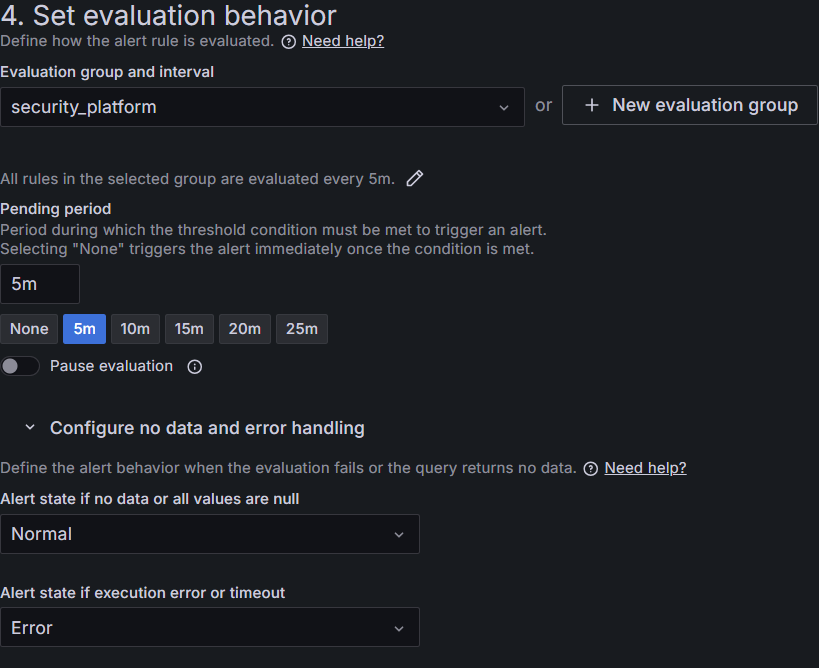
Notifications
https://grafana.com/docs/grafana/latest/alerting/fundamentals/notifications/
Notifications 由下面几部分组成
- Notification policies
- Contact points
开始定义您的联系点,以指定如何接收您的警报通知。然后,配置您的警报规则将其警报发送到联系点或使用通知策略树以灵活地将警报路由到联系点。
Notification policies
Contact points
在 Contact points 中的 Notification Templates 标签中,可以定义通知模板(i.e. 发送出去的信息最终会使用什么格式和内容)
Template
参考:
可以在下面这些地方使用模板
- Alert rule annotations
- Alert rule labels
- Notifcation templates
获取某个 Query(查询) 或 Condition Expressions(条件表达式) 的值
// 获取表达式 A 的值
{{ index $values "A" }}
// 或
{{ $values.A.Value }}
警报通知数据结构
其他参考
意见反馈
这个页面对您有帮助吗?
Glad to hear it! Please tell us how we can improve.
Sorry to hear that. Please tell us how we can improve.